Local SEO for Small Business: 10 Things That Actually Work

Local SEO is the difference between your phone ringing or staying silent.
When someone searches “best pizza near me” or “emergency plumber in [city],” you want your business to show up. Not your competitor across town — you.
Most small business owners know they “should do SEO” but don’t know where to start. They’ve read listicles full of tactics that don’t work. They’re frustrated.
This guide is different. These are 10 tactics we’ve seen deliver real results for real small businesses.
1. Claim and Optimize Your Google Business Profile
This is the foundation. If you do nothing else, do this.
Setup:
- Go to business.google.com
- Search for your business name
- Claim existing or create new
- Verify (postcard, phone, or email)
Optimize every field:
- Business name (use official name, no keyword stuffing)
- Primary category (choose the most specific option)
- Secondary categories (add relevant others)
- Complete address and service area
- Phone number (local number when possible)
- Website URL
- Hours (keep accurate, update for holidays)
- Photos (regularly add new ones)
Businesses with complete Google Business Profiles get 50% more clicks than those with incomplete profiles.
2. Maintain NAP Consistency Everywhere
NAP = Name, Address, Phone number.
Your NAP must be identical across every listing on and off the internet. Not “St.” vs “Street.” Not different phone formats.
Where to check:
- Your website (footer, contact page, every page)
- Google Business Profile
- Yelp
- Bing Places
- Apple Maps
- Yellow Pages
- Industry directories
- Any place your business appears
Inconsistencies confuse Google and hurt your local ranking.
3. Get More Google Reviews (The Right Way)
Reviews are critical for local SEO and trust. But there’s a right way and a wrong way.
What’s allowed:
- Asking satisfied customers to leave reviews
- Providing a direct link to your review page
- Responding to every review (positive and negative)
- Displaying review request signage in your business
What’s NOT allowed:
- Paying for reviews
- Creating fake reviews
- Only asking happy customers (review gating)
- Offering incentives for reviews
After every positive interaction, simply ask: “Would you mind leaving us a Google review? Here’s the link.” Make it easy.
Respond to every review. Thank positive reviewers. Address negative ones professionally and offline.
4. Add Location Pages If You Serve Multiple Areas
If you’re a contractor, landscaper, or service business serving multiple cities, create dedicated landing pages for each area.
Example:
/locations/austin/— Austin page/locations/cedar-park/— Cedar Park page/locations/round-rock/— Round Rock page
Each page should have:
- Unique content (not just the city name swapped)
- Address and phone for that location
- Service details specific to that area
- Testimonials from customers in that area
- Area-specific keywords
Don’t create thin pages. Google detects and penalizes low-quality doorwar pages.
5. Build Local Citations Strategically
Citations are mentions of your business on other websites. They help Google verify your business exists.
Priority directories for every business:
- Yelp
- Yellow Pages
- Bing Places
- Apple Maps
- Facebook Business Page
- BBB (Better Business Bureau)
- Industry-specific directories
Then expand to:
- Local Chamber of Commerce
- Local business associations
- City/regional directories
- News websites (if you’ve been featured)
Moz Local and BrightLocal can help audit and build citations at scale, but you can do it manually for free.
6. Use Local Business Schema Markup
Schema is code that helps search engines understand your content. Local business schema tells Google exactly what you are and where you are.
Add this to your website’s <head> section:
<script type="application/ld+json">
{
  "@context": "https://schema.org",
  "@type": "LocalBusiness",
  "name": "Your Business Name",
  "address": {
    "@type": "PostalAddress",
    "streetAddress": "123 Main St",
    "addressLocality": "Austin",
    "addressRegion": "TX",
    "postalCode": "78701"
  },
  "telephone": "+1-555-123-4567"
}
</script>
Many CMS platforms (WordPress, Shopify, Wix) have plugins to add this without touching code.
7. Optimize for “Near Me” Searches
Searches with “near me” have exploded. To capture them:
- Include your city and neighborhood in page titles and content
- Add neighborhood-specific landing pages if relevant
- Use natural language in your content (not just keywords)
- Get listed in local directories (see citation building above)
“Near me” searches are often high-intent — the searcher is ready to buy now.
8. Create Locally Relevant Content
Blog posts, guides, and resources that speak to your local area attract local links and mentions.
Content ideas:
- “Top 10 Restaurants in [Your City] for [Occasion]”
- “[City] Local Events Guide: [Year]”
- “Why [Your Industry] Businesses in [City] Should [Do Something]”
- Interview local business owners
- Sponsor and document local events
This content earns local backlinks and signals to Google you’re a real local business.
9. Optimize Your Website for Mobile
Over 60% of local searches happen on mobile devices. If your site doesn’t work well on phones, you’re losing customers.
Quick mobile checks:
- Can you tap phone numbers to call?
- Is text readable without zooming?
- Do buttons have enough space (44pt minimum tap targets)?
- Does it load in under 3 seconds on 4G?
- Are forms easy to fill out on mobile?
Use Google’s Mobile-Friendly Test to check your site.
10. Track and Measure Results
You can’t improve what you don’t measure.
Key local SEO metrics:
- Google Business Profile insights — Searches, views, clicks, calls
- Organic traffic — From Google Analytics (filter by location queries)
- Keyword rankings — Where do you rank for “[service] in [city]”?
- Review count and sentiment — Quantity and quality of reviews
- Citation count — How many places list your business?
Set up Google Search Console to see which queries bring you traffic and how you rank for them.
Common Local SEO Mistakes to Avoid
Ignoring Google Business Profile posts — Posts expire after 6 months. Stay active.
Keyword stuffing in business names — This violates Google guidelines and can get your listing suspended.
Fake addresses — Don’t add addresses where you don’t actually operate. It’s deceptive and Google catches it.
Ignoring negative reviews — Unaddressed negative reviews hurt your reputation and SEO.
** Expecting instant results** — Local SEO takes 3-6 months minimum to show impact. Stay consistent.
Need Help With Local SEO?
These tactics work — but implementing them takes time and attention. If you’d rather focus on running your business, we offer local SEO services that handle all of this for you.
We’ve helped businesses across industries — from restaurants to law firms to home services — improve their local search visibility and bring in more customers.
Ready to dominate local search? Get in touch to discuss your local SEO strategy.
Related reading:

Written by Gustavo Vasquez
Web developer and digital marketing consultant helping small businesses get online. 15+ years of tech experience, bilingual (English/Spanish).
Book a free consultationRelated Articles
How to Get More Customers with Google Business Profile in 2026
Step-by-step guide to optimizing your Google Business Profile for more calls, visits, and customers. Proven GBP strategies that work in 2026.
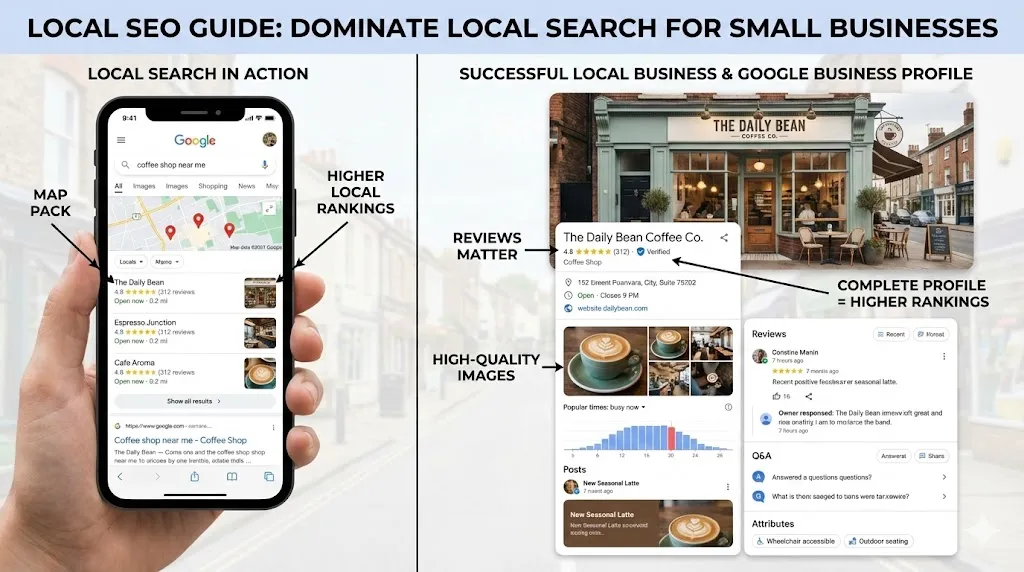
How Local SEO Can 10X Your Small Business
Learn how local SEO helps small businesses appear in Google Maps, earn ethical reviews, and turn a practical checklist into local visibility.
Website Maintenance Checklist: What to Review Every Month
A practical monthly website maintenance checklist covering forms, backups, updates, security, speed, analytics, broken links, and business information.
Need help with your project?
Whether it's SEO, a new website, or fixing bugs - I can help.
Get in Touch