How Local SEO Can 10X Your Small Business
How Local SEO Can 10X Your Small Business (Even If You’re Not Tech-Savvy)
A pizza shop owner told me he was spending $2,000 a month on newspaper ads. Getting maybe 5-10 customers from it.
I helped him set up his Google Business Profile correctly, got him 50 Google reviews in two months, and made sure his website mentioned his city on every page.
Result: 300+ new customers found him on Google Maps in the first 90 days. Cost: $0.
Local SEO isn’t complicated. But most small businesses either don’t know about it or do it wrong.
Here’s everything you need to know.
What Is Local SEO (And Why It’s Different From Regular SEO)
Regular SEO = Trying to rank on Google for broad terms like “best running shoes”
Local SEO = Trying to rank on Google when someone near you searches for what you offer
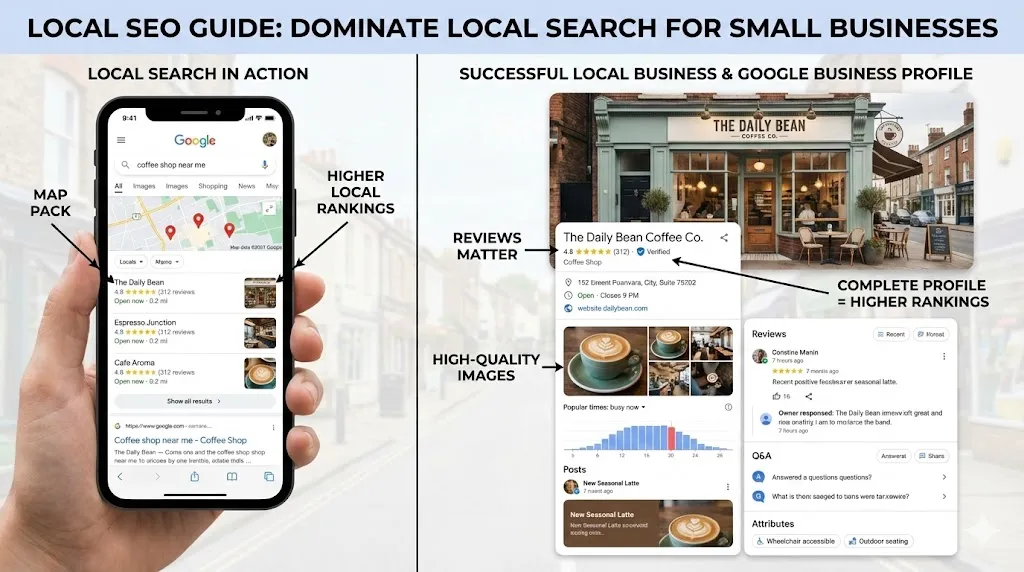
When someone types “pizza near me” or “plumber in Brooklyn” or “dentist downtown,” Google shows three things:
- Google Maps Pack (the map with 3 businesses listed)
- Local organic results (regular search results filtered by location)
- Paid ads (if businesses are running them)
Local SEO gets you into that Maps Pack and those local results without paying for ads.
Why This Matters for Your Business
- 46% of all Google searches have local intent
- 76% of people who search for something nearby visit a business within 24 hours
- 28% of local searches result in a purchase
- 97% of people learn more about a local company online than anywhere else
If you’re a local business and you’re not doing local SEO, you’re invisible to almost half of all Google searches.
The #1 Thing You Need: Google Business Profile
Google Business Profile (formerly Google My Business) is the single most important thing for local SEO.
It’s that box that shows up when you Google a business — with the map, hours, reviews, photos, and contact info.
If you don’t have one, stop reading and go set one up right now. It’s free.
How to Set Up Your Google Business Profile
Step 1: Claim or Create Your Profile
Go to business.google.com and sign in with your Google account.
- If your business already appears on Google Maps, claim it
- If it doesn’t, create a new listing
Step 2: Fill Out EVERYTHING
Don’t leave anything blank:
- ✅ Business name (exactly as it appears in real life — don’t stuff keywords)
- ✅ Address (use your real address, not a P.O. Box)
- ✅ Phone number (local number, not 800 number)
- ✅ Website URL
- ✅ Hours of operation (including holidays)
- ✅ Business category (pick the most specific one — “Italian Restaurant” not just “Restaurant”)
- ✅ Business description (750 characters, mention your city and services)
- ✅ Services/products (list everything you offer)
- ✅ Photos (at least 10 — exterior, interior, team, products)
- ✅ Service area (if you go to customers)
Step 3: Verify Your Business
Google will verify you actually own this business. Usually by:
- Postcard (they mail a code to your address)
- Phone (automated call with a code)
- Email (sometimes available)
- Video (Google may ask you to record a video of your business)
This takes 1-14 days. Don’t skip it — unverified businesses don’t rank well.
Step 4: Keep It Updated
Your profile isn’t “set it and forget it.” Update it:
- Add new photos weekly (businesses with 100+ photos get 520% more calls)
- Post updates (Google Posts — like social media but on Google)
- Respond to every review (more on this below)
- Update hours for holidays
- Add new services as you offer them
Google Reviews: Your Secret Weapon
Reviews are the #2 factor for local SEO ranking (after your Google Business Profile).
More reviews + higher ratings = higher ranking in Google Maps.
How to Get More Reviews
The simple formula: Ask + Make it easy + Follow up
✅ Ask every customer
Most happy customers will leave a review if you ask. Most businesses never ask.
- After a service: “We’d love your feedback on Google”
- At checkout: “If you had a great experience, a Google review would mean the world to us”
- In follow-up emails: Include a direct link to your Google review page
✅ Make it ridiculously easy
Create a direct link to your Google review page:
- Search your business on Google
- Click “Write a review”
- Copy that URL
- Shorten it (use bit.ly if needed)
- Put it everywhere: email signature, receipts, business cards, text messages
✅ Follow up
- Send a text/email after service: “Thanks for choosing us! Would you mind leaving a quick Google review? [link]”
- Follow up once if they didn’t review (but don’t be pushy)
What NOT to Do with Reviews
- ❌ Don’t buy fake reviews (Google will catch you and penalize your listing)
- ❌ Don’t offer money for reviews (against Google’s terms)
- ❌ Don’t review your own business
- ❌ Don’t ignore negative reviews
How to Handle Negative Reviews
Negative reviews happen. How you respond matters more than the review itself.
Response template:
“Hi [Name], thank you for your feedback. We’re sorry about your experience with [specific issue]. We’d love to make it right — please reach out to us at [phone/email] so we can resolve this. We value every customer and want to ensure you have a better experience next time.”
Why this works:
- Shows potential customers you care
- Often the reviewer will update their rating
- Google sees you’re engaged with your customers
Goal: 50+ reviews with a 4.5+ star rating. This puts you ahead of 90% of local competitors.
NAP Consistency (This Is More Important Than You Think)
NAP = Name, Address, Phone Number
Your business name, address, and phone number need to be exactly the same everywhere online.
Not “kind of the same.” Exactly the same.
Why This Matters
Google cross-references your information across the internet. If your address is “123 Main Street” on your website but “123 Main St.” on Yelp and “123 Main St, Suite A” on Facebook, Google gets confused.
Confused Google = lower rankings.
Where to Check NAP Consistency
- Your website (header, footer, contact page)
- Google Business Profile
- Facebook page
- Yelp listing
- Yellow Pages
- BBB listing
- Industry-specific directories
- Apple Maps
- Bing Places
How to Fix Inconsistencies
- Pick your official NAP format
- Update it everywhere — every directory, every social media, your website
- Use a tool like Moz Local or BrightLocal to find and fix inconsistencies
- Check quarterly for new inconsistencies
Local Keywords: What to Target
You need to use location-based keywords on your website.
Keyword Formula
[Service] + [Location]
Examples:
- “plumber in Brooklyn”
- “best pizza in Austin”
- “dentist near downtown Chicago”
- “hair salon Williamsburg”
Where to Use Local Keywords
✅ Page titles
- Not: “Our Services”
- Yes: “Plumbing Services in Brooklyn, NY”
✅ Meta descriptions
- Not: “We offer great plumbing services”
- Yes: “Need a plumber in Brooklyn? 24/7 emergency plumbing services with same-day appointments. Call now.”
✅ Headers (H1, H2)
- Not: “About Our Company”
- Yes: “Brooklyn’s Most Trusted Plumbing Company”
✅ Body content
Naturally mention your city, neighborhood, and service area throughout your content.
✅ Image alt text
- Not: “photo1.jpg”
- Yes: “plumber-fixing-sink-brooklyn-ny”
✅ URL slugs
- Not: yoursite.com/services
- Yes: yoursite.com/plumbing-services-brooklyn
Important: Don’t Keyword Stuff
Mentioning “Brooklyn plumber” 47 times on one page will hurt you, not help you.
Write naturally. Mention your location where it makes sense. Google is smart enough to understand.
Citations and Directories (Free Visibility)
Citations are mentions of your business on other websites. They help Google verify your business is real and trustworthy.
Top Directories to Get Listed On (Free)
- Google Business Profile (most important)
- Yelp
- Facebook Business Page
- Apple Maps (via Apple Business Connect)
- Bing Places
- Yellow Pages (YP.com)
- BBB (Better Business Bureau)
- Nextdoor
- Industry-specific directories (Avvo for lawyers, Healthgrades for doctors, TripAdvisor for restaurants)
How to List Your Business
For each directory:
- Search to see if you already have a listing
- If yes, claim it and update the information
- If no, create one
- Use your exact NAP information (consistency matters!)
- Add photos, description, hours, website link
- Set a calendar reminder to update quarterly
Time investment: About 2-3 hours to set up all major directories. Then 30 minutes quarterly to maintain.
Mobile Optimization (Non-Negotiable for Local)
60%+ of local searches happen on mobile devices.
If your site doesn’t work well on phones, you’re losing most of your potential customers.
Mobile Essentials
- ✅ Click-to-call phone number — Tap and call, don’t make them memorize it
- ✅ Click-for-directions — Link to Google Maps
- ✅ Fast load time — Under 3 seconds on mobile
- ✅ Readable text — No zooming needed (16px minimum)
- ✅ Easy navigation — Simple menu, big tap targets
- ✅ Mobile-friendly forms — Big fields, minimal required info
Test Your Mobile Experience
- Open your website on your phone right now
- Try to find your phone number (can you tap to call?)
- Try to find your address (can you tap for directions?)
- Fill out your contact form on mobile (is it easy?)
- Check the load time (is it fast?)
If any of these fail, fix them immediately.
Tracking Your Local SEO Results
You can’t improve what you don’t measure.
Free Tools to Track Progress
Google Business Profile Insights:
- How many people found your profile
- What searches they used to find you
- How many called, visited your website, or requested directions
- Photo views compared to competitors
Google Analytics:
- Total website traffic
- Traffic from organic search
- Which pages get the most visits
- How long people stay on your site
Google Search Console:
- What keywords your site appears for
- Your average position for each keyword
- Click-through rates
- Technical issues
What to Track Monthly
| Metric | Why It Matters |
|---|---|
| Google Business Profile views | Are more people seeing your listing? |
| Phone calls from profile | Are views converting to calls? |
| Direction requests | Are people coming to your location? |
| Website clicks from profile | Are people wanting to learn more? |
| Review count and average rating | Is your reputation growing? |
| Organic search traffic | Are you ranking better? |
| Keyword rankings for target terms | Are you improving for important searches? |
The Local SEO Checklist
Google Business Profile
- ☐ Profile claimed and verified
- ☐ All information complete (name, address, phone, hours, category)
- ☐ Business description written with local keywords
- ☐ 10+ photos uploaded (exterior, interior, team, products)
- ☐ Services/products listed
- ☐ Google Posts being published weekly
Reviews
- ☐ System in place to ask every customer for reviews
- ☐ Direct review link created and shared
- ☐ All reviews being responded to (positive and negative)
- ☐ Goal: 50+ reviews with 4.5+ stars
Website
- ☐ Local keywords in page titles and meta descriptions
- ☐ City/location mentioned naturally in content
- ☐ NAP consistent across entire site
- ☐ Mobile-friendly and fast-loading
- ☐ Contact page with embedded Google Map
- ☐ Click-to-call phone number on mobile
Citations
- ☐ Listed on top 10 directories
- ☐ NAP consistent across all listings
- ☐ Industry-specific directories covered
- ☐ Quarterly review scheduled
Content
- ☐ Local-focused blog posts (monthly minimum)
- ☐ Location pages for each service area
- ☐ FAQ page with local questions answered
Common Local SEO Mistakes
Mistake #1: Ignoring Google Business Profile
Your Google Business Profile is your most powerful local SEO tool. If you haven’t set it up or haven’t updated it in months, you’re leaving money on the table.
Fix: Set it up today. Update it weekly.
Mistake #2: Not Asking for Reviews
Hoping customers will leave reviews on their own is a strategy that doesn’t work. Most happy customers need a nudge.
Fix: Create a system. Ask every customer. Make it easy with a direct link.
Mistake #3: Inconsistent NAP
Having different business information across the internet confuses Google and hurts your rankings.
Fix: Audit your listings. Pick one format. Update everywhere.
Mistake #4: No Local Content on Website
Your website doesn’t mention your city, neighborhood, or service area.
Fix: Add location keywords to titles, headers, content, and meta descriptions.
Mistake #5: Ignoring Mobile
Your competitors who have mobile-friendly sites are getting the calls you’re missing.
Fix: Test your site on your phone. Fix everything that’s broken.
Mistake #6: Trying to Rank Everywhere
You’re in Brooklyn but trying to rank for “plumber in New York City.” Too broad, too competitive.
Fix: Focus on your immediate area first. Dominate your neighborhood, then expand.
Mistake #7: Set It and Forget It
Local SEO isn’t a one-time thing. It requires ongoing effort.
Fix: 30 minutes per week on updates, reviews, and content.
The Bottom Line
Local SEO is the highest-ROI marketing a small business can do.
It’s free (or very cheap). It targets people actively searching for what you offer. And it works 24/7.
Start here:
- Set up and optimize your Google Business Profile
- Start getting Google reviews (aim for 50+)
- Make sure your NAP is consistent everywhere
- Add local keywords to your website
- Get listed on major directories
- Make your site mobile-friendly
- Track your results monthly
You don’t need to be tech-savvy. You don’t need a big budget. You just need to do these things consistently.
Need help getting your business found on Google? We specialize in local SEO for small businesses. Visit gusdigitalsolutions.com for a free consultation.
Stop being invisible. Start getting found.

Written by Gustavo Vasquez
Web developer and digital marketing consultant helping small businesses get online. 15+ years of tech experience, bilingual (English/Spanish).
Book a free consultationRelated Articles
How to Get More Customers with Google Business Profile in 2026
Step-by-step guide to optimizing your Google Business Profile for more calls, visits, and customers. Proven GBP strategies that work in 2026.
Social Media Marketing for Small Business: What Actually Works in 2026
No-fluff guide to social media marketing for small businesses. Which platforms to use, what to post, and how to actually get customers from social media in 2026.

How to Write Website Copy That Converts (Without Hiring a Copywriter)
Learn to write website copy that turns visitors into customers. Practical formulas for headlines, CTAs, service pages, and about pages that actually convert.
Need help with your project?
Whether it's SEO, a new website, or fixing bugs - I can help.
Get in Touch